Follow movement
Use each visible person’s position and changing posture to provide continuous cues for falls, running and dwell.
01 / MULTI-PERSON BEHAVIOR
From suspected strikes and pushing to falls, Monitor Bot uses person tracks and movement relationships to surface reviewable cues for safety incidents and concerns about mistreatment.
MULTI-PERSON / TEMPORAL CONTEXT
Many events involve more than one person. Multi-person tracking, paired skeletal cues and temporal context help evaluate changing interactions. Event timestamps and clips give your team the context to make a judgment.
Use each visible person’s position and changing posture to provide continuous cues for falls, running and dwell.
Compare two people’s movements and relative positions for suspected striking, pushing and dragging.
Return to footage to distinguish everyday contact, assistance and behavior that needs closer attention.
MULTI-PERSON RECOGNITION
Follow people through their poses and movement paths, giving your team clearer cues for reviewing interactions in context.
Recorded overlays show what the development pipeline surfaced. They are not a live feed or a site-wide accuracy claim.
Per-frame inference shows actual multi-person poses and anonymous tracks, with temporal stabilization of the skeleton display. Occlusion and seated poses can still cause missing or partial skeletons and track changes. No strike or fall classification was run. Website presentation edits only textual labels; footage, recorded actions and model output are preserved.
Kitware Inc. / IARPA — MEVA · Edited, privacy-masked, Monitor Bot model overlays · Footage source · CC BY 4.001 / BEHAVIOR IN MOTION
Follow interaction and fall cues to event timestamps, then review the footage in context. Switch patterns to explore the key moments.
Two-person interactionMOVEMENT · EVENT · REVIEW
Posture and movementMOVEMENT · EVENT · REVIEW
This demonstration could not load. Please retry or watch the official film above.
Controlled device replay · Privacy-masked · In development. These scenes are not customer incidents, universal quality evidence or legal determinations of behavior.
FROM CUE TO REVIEW
Connect suspected strike and fall cues to event times and footage, giving your team the context to review what happened.
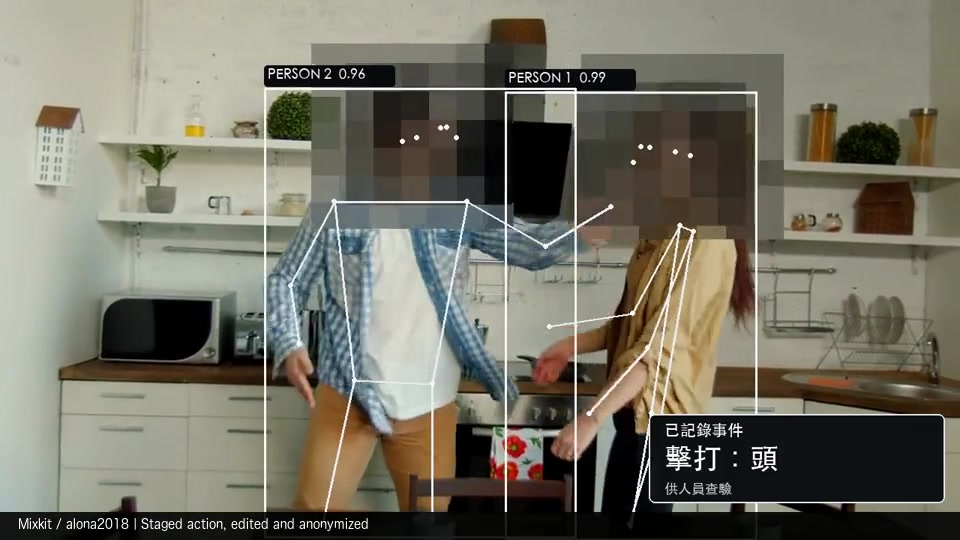
Person tracks, pose and relative motion within the camera view.
A time and pattern label point reviewers to a relevant clip.
Compare the moments before and after, and confirm what happened on site.
The pictured replay is a controlled staged scene, not an incident or validated multi-person accuracy result. Site-specific camera angle, occlusion and similar routine movements must be tested. Model output does not decide intent, cause or legal responsibility.
COMMON SCENARIOS / CONFIGURED FOR YOUR SITE
Explore common applications across individual movement, interactions and space management. Choose what matters at your site, then configure and validate it in stages. Additional scenarios and model tuning can be assessed through Enterprise.
Showing common scenarios
Posture and movement
Review transitions from standing to a low posture and other fall cues alongside surrounding footage.
Head-directed interaction
Evaluate hand-to-head strike patterns from two people’s skeletal and movement relationships.
Torso-directed interaction
Focus on strike patterns directed toward another person’s torso.
Arm and leg interaction
Evaluate strike patterns toward another person’s arms or legs, with sufficient visible joints.
Dragging another person
Evaluate movement relationships between two people. Disabled by default; configuration and a pilot are required.
Height and climbing movement
Combine a high-place zone with motion cues. Disabled by default; a climbing zone and validation are required.
Sustained single-person presence
Review situations with one person persistently visible and determine whether the context needs attention.
People gathering nearby
Evaluate gathering using person and skeletal cues, with everyday activity included in testing.
Remaining in a small area
Use person tracks and elapsed time to evaluate sustained movement within a small area.
Changes in movement speed
Evaluate motion above walking speed from consecutive tracks and validate the camera perspective.
Close interaction between two people
Use paired skeletal and motion cues rather than treating proximity alone as an event.
Entering a defined area
Review movement from outside a configured area to inside. Requires a valid area of interest.
Activation depends on your plan, deployment settings and site validation; dragging and climbing are disabled by default. Additional scenarios, model sensitivity and integration needs can be assessed through Enterprise.
SITE VALIDATION
Visibility, everyday interactions and the review process matter more than a single demonstration.
Check person size, visible joints, overlapping bodies and camera height.
Test density, lighting, camera angles and everyday movements that resemble target events.
Match timestamps, labels and clips; record false positives, missed events and response steps.
Plans allow behavior capture for up to 5 or 30 people at once. Recognition performance depends on cameras, activity and hardware, and is confirmed through site testing and acceptance criteria.
Deployment
LET’S TALK ABOUT YOUR SPACE
Start with an assessment of your site, configuration and validation needs.
Discuss your site